· 17 min read
NLP #2: Unicode and UTF-8
On this page
Before a natural language processing (NLP) model can split text into words or tokens, the text has to exist inside the computer, where there are only numbers. This post covers section 2.3 of Speech and Language Processing: how a character becomes a number (Unicode), and how that number becomes bytes in a file (UTF-8). The next post builds on it: modern tokenizers start from exactly these bytes.
Intuition
Every character gets a number
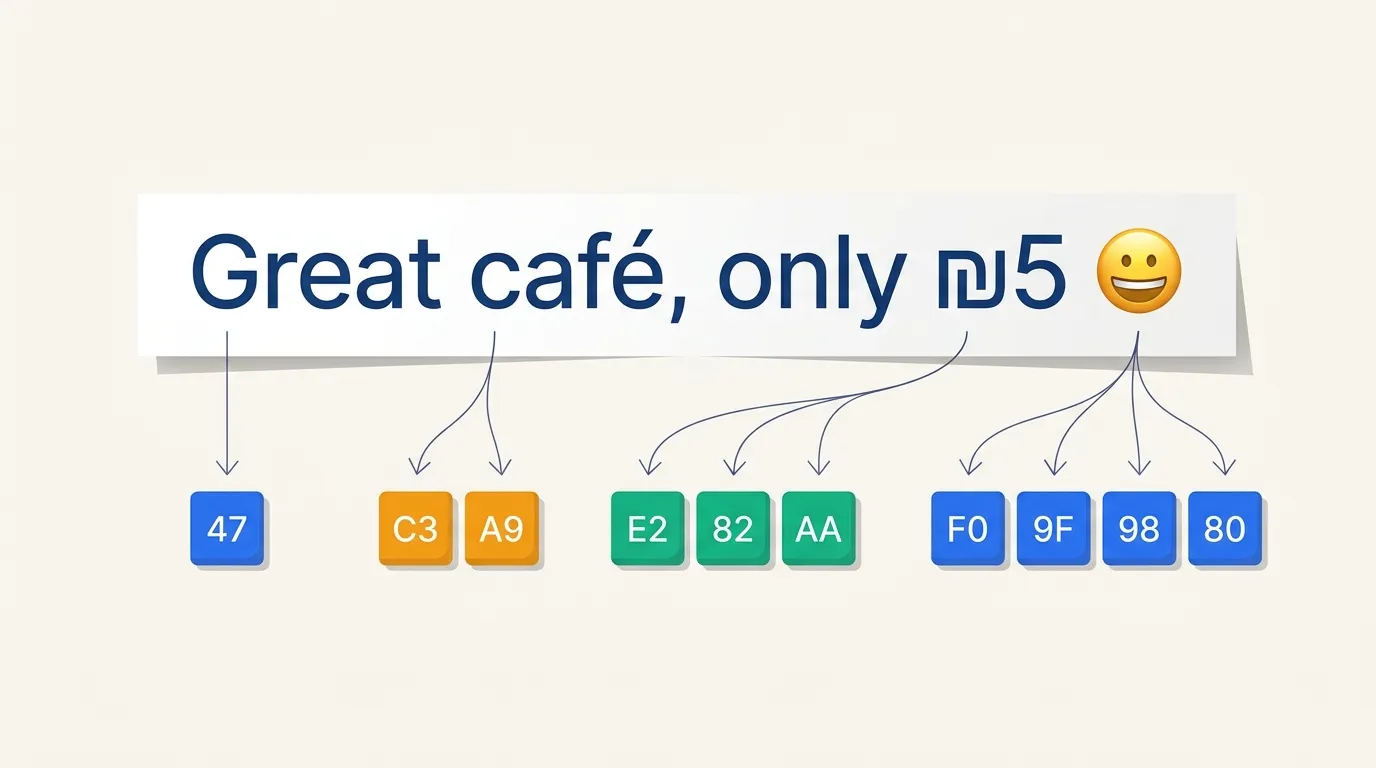
Our running example for this post is a short review:
Great café, only ₪5 😀
In the 1960s, computers in the US stored English text with a code called
ASCII. It gave each character a number below 128: a is 97, G is 71,
a space is 32. Each character took one
byte. A byte is 8
bits, and each bit is a 0 or a 1. That
gives 256 possible values, from 0 to 255. ASCII has no é, no ₪, no Hebrew,
no Chinese and no emoji. Three of the characters in our review don't exist in
it.
Unicode fixes that with one big list of every character in every writing system: Latin, Hebrew, Arabic, Devanagari, Chinese and ancient scripts like cuneiform. It also covers math symbols and emoji. Version 16.0 has more than 150,000 characters from 168 scripts. Each one gets its own number, called a code point.
Code points are written in hexadecimal,
which counts in base 16 instead of base 10. It uses the digits 0–9, then A–F
for 10 to 15. We write U+ in front: é is U+00E9, ₪ is U+20AA and 😀 is
U+1F600. The first 128 code points are exactly ASCII, so a is still 97. In
hexadecimal that's U+0061, because 61 means 6 sixteens plus 1:
.
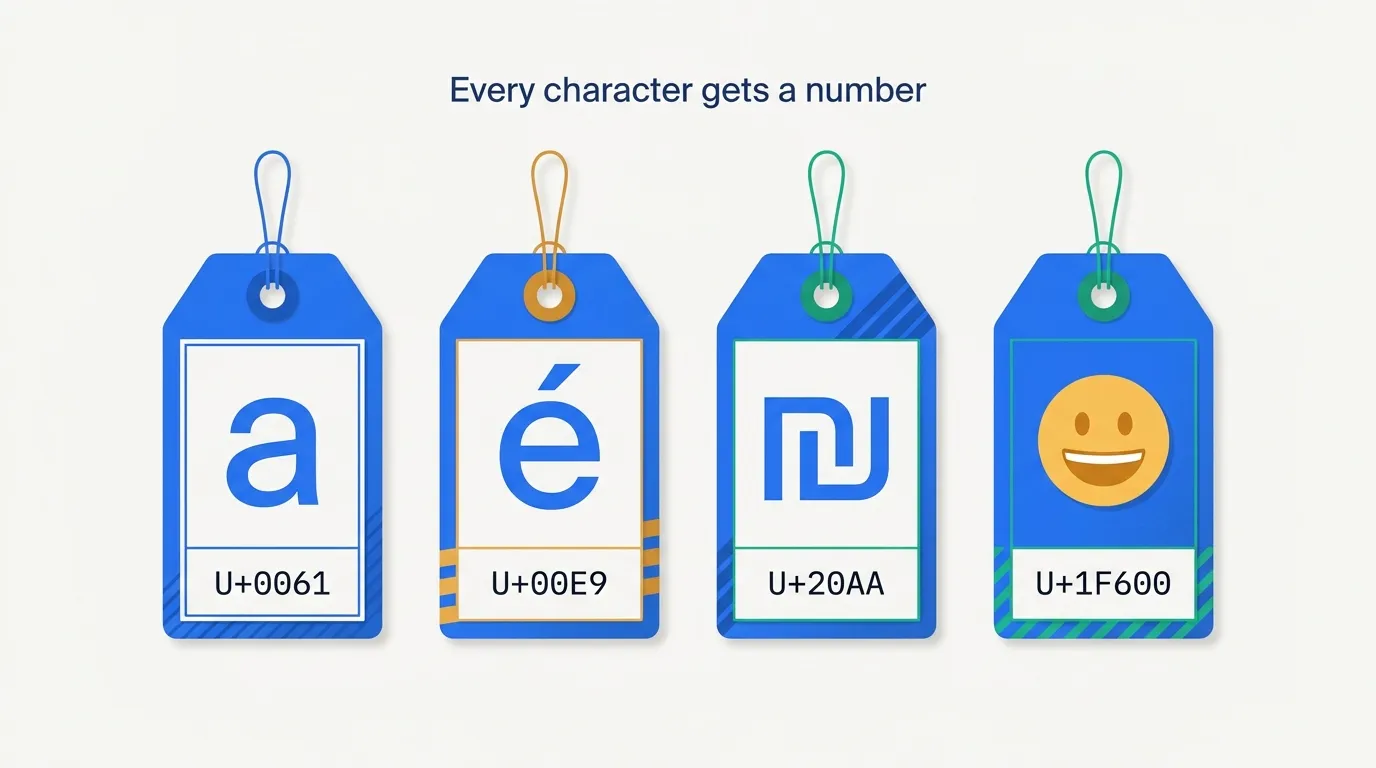
A code point names a character. It doesn't say how the character looks.
That's the font's job: a in bold, in italics or in a typewriter font is
the same code point. The drawn shape is called a glyph.
Short codes for common characters
Now we need to write those numbers into a file. The simplest way is to give every character 4 bytes, enough for the largest code point. Our review has 21 characters, so it would take 84 bytes, most of them zeros. That wastes space. Worse, old software reads a zero byte as "end of text".
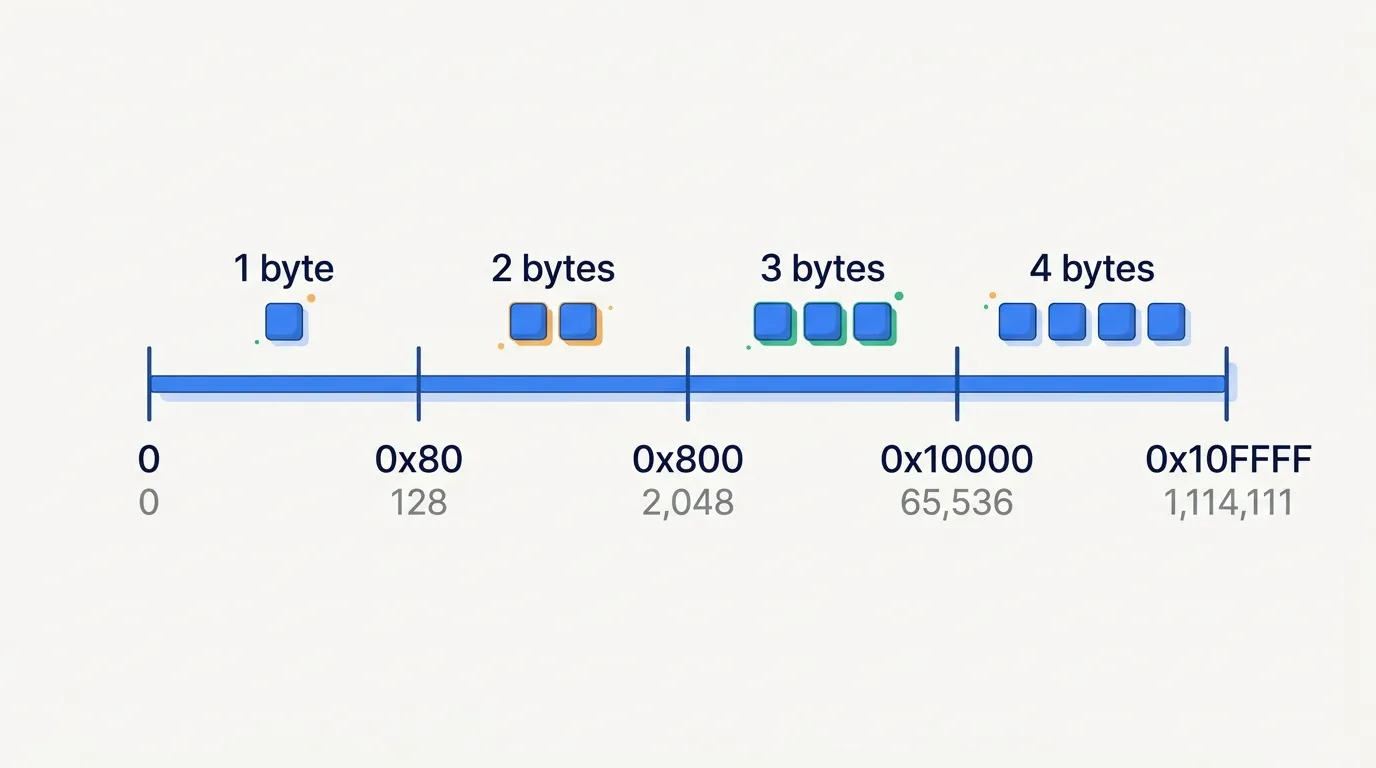
An encoding is a rule for turning code points into bytes. UTF-8, the encoding used by nearly all of the web, uses short codes for common characters and longer ones for rare characters:
- 1 byte for ASCII: English letters, digits, punctuation.
- 2 bytes for accented Latin letters like
é, and for Greek, Cyrillic, Hebrew and Arabic letters. - 3 bytes for most Chinese, Japanese and Korean characters, and symbols like
₪. - 4 bytes for emoji and rare characters.
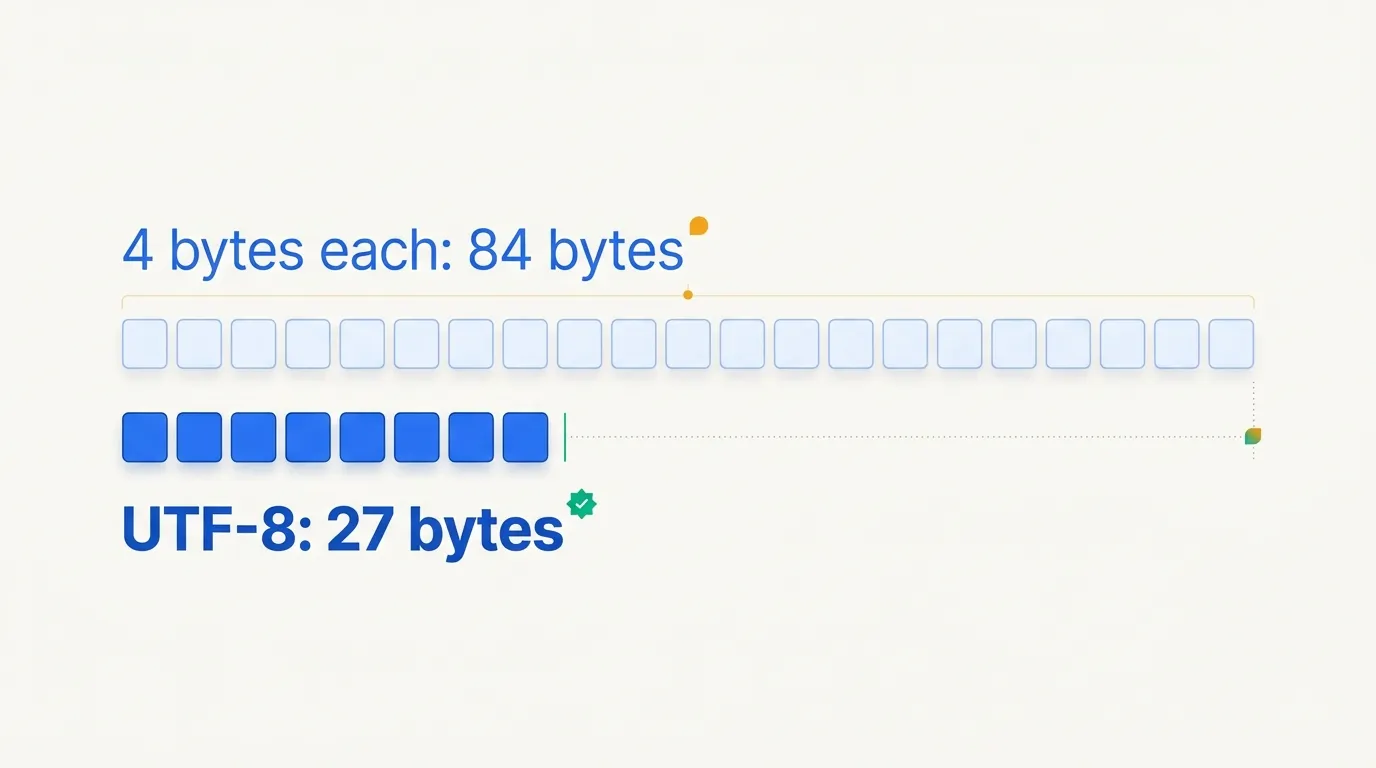
Our review takes 27 bytes instead of 84. Since ASCII characters keep their single byte, every old ASCII file is already valid UTF-8. Try it with your own text:
21 characters → 27 bytes in UTF-8 (84 in UTF-32)
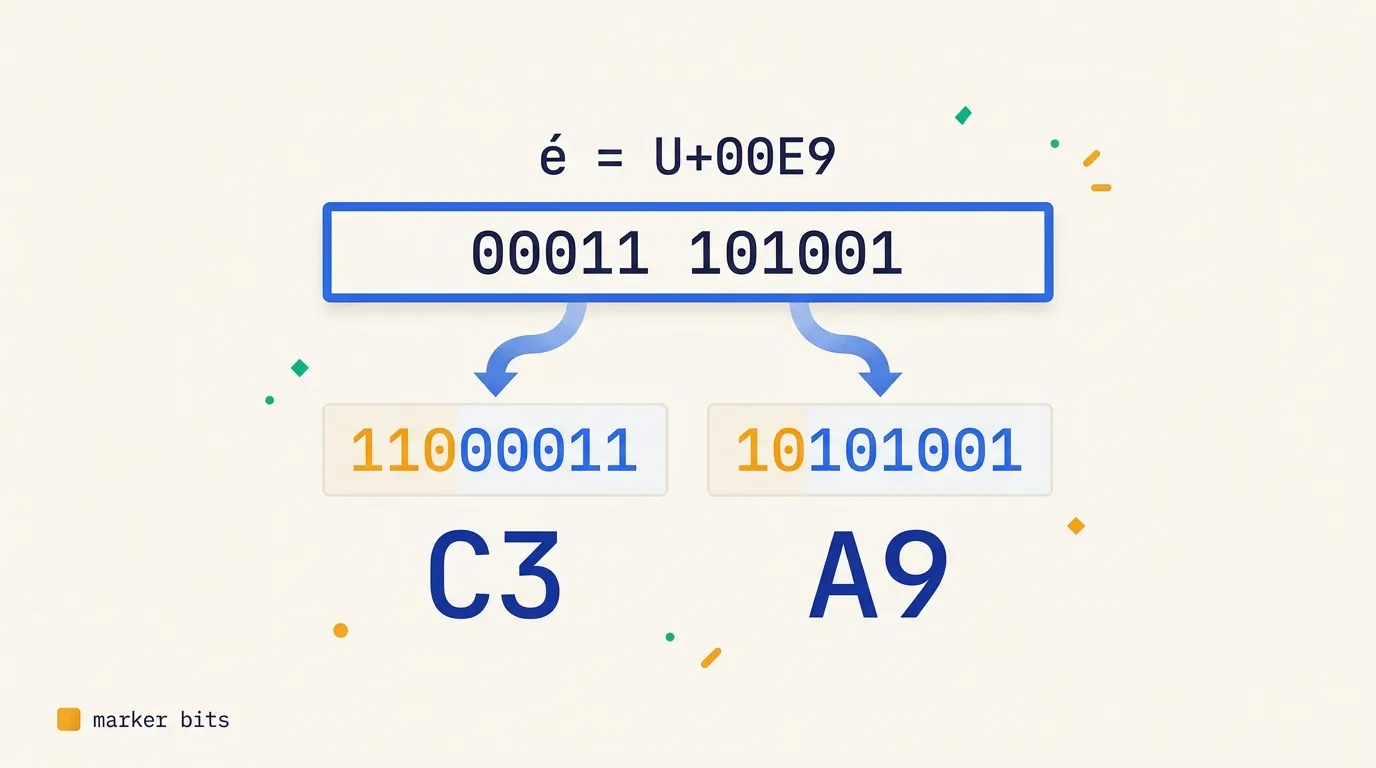
code point U+00E9 = 00011 101001
UTF-8 bytes = 11000011 10101001 (C3 A9)
Underlined: the marker bits that say how many bytes follow.
How a program knows where a character ends
A file is one long row of bytes, with no gaps between characters and no
lengths stored next to them. So how does a program know that é takes two
bytes while the 5 takes one?
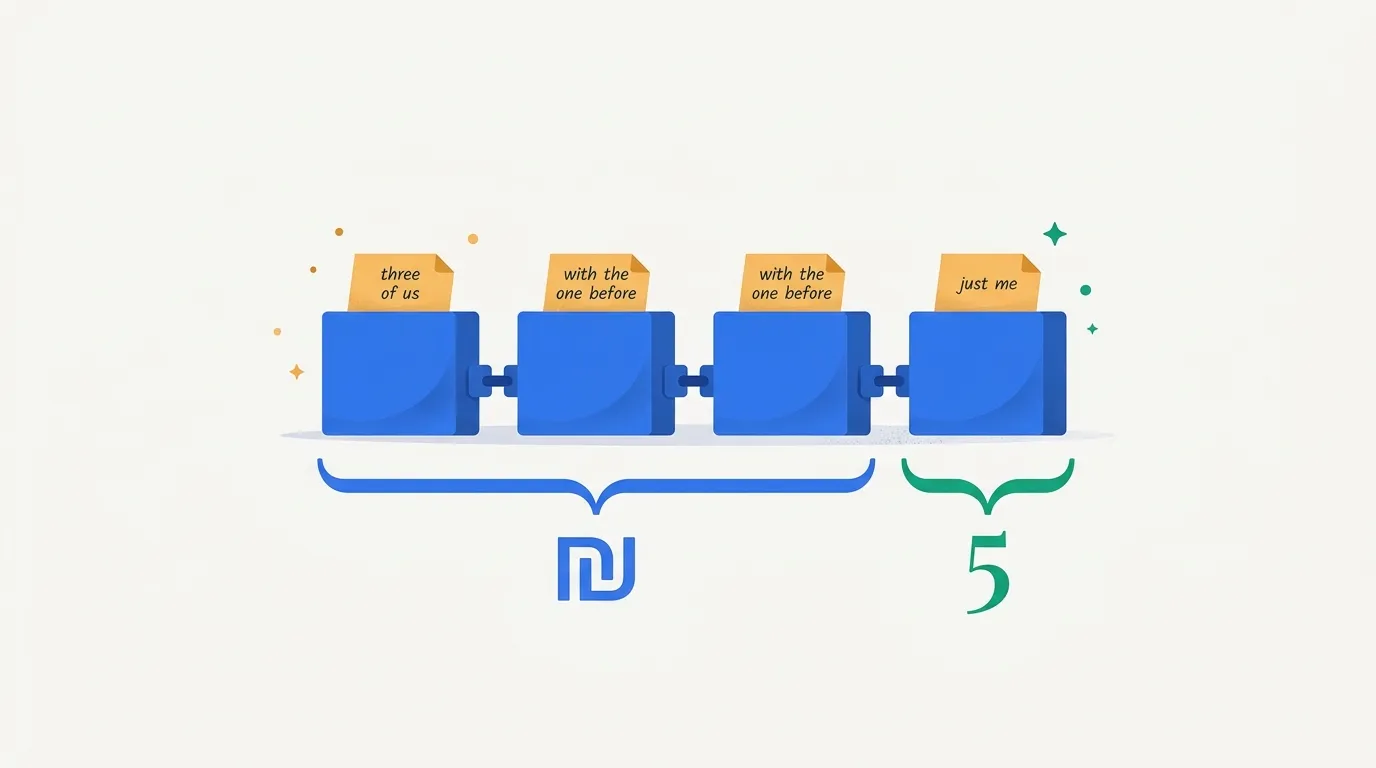
Every byte starts with a small label. On a character's first byte, the label says how long the character is: "just me", "two of us", "three of us" or "four of us". On every later byte, it says "I belong to the one before me". The program reads a label, takes that many bytes, then does the same for the next character.
₪5 is saved as four bytes. The first byte says "three of us", so that byte
and the next two make ₪. The fourth says "just me", so it's the 5. The math
section shows the exact bits.
Characters and bytes are different counts
So a text has two lengths: how many characters it has, and how many bytes it takes. For English text they are equal. For Hebrew they're not: "שלום" has 4 characters and takes 8 bytes.
Every text file is stored in some encoding. Read it with the wrong one and
you get garbage: a UTF-8 é read as an older Western-European encoding
shows up as é. If you've seen "café" on a website, that's what happened.
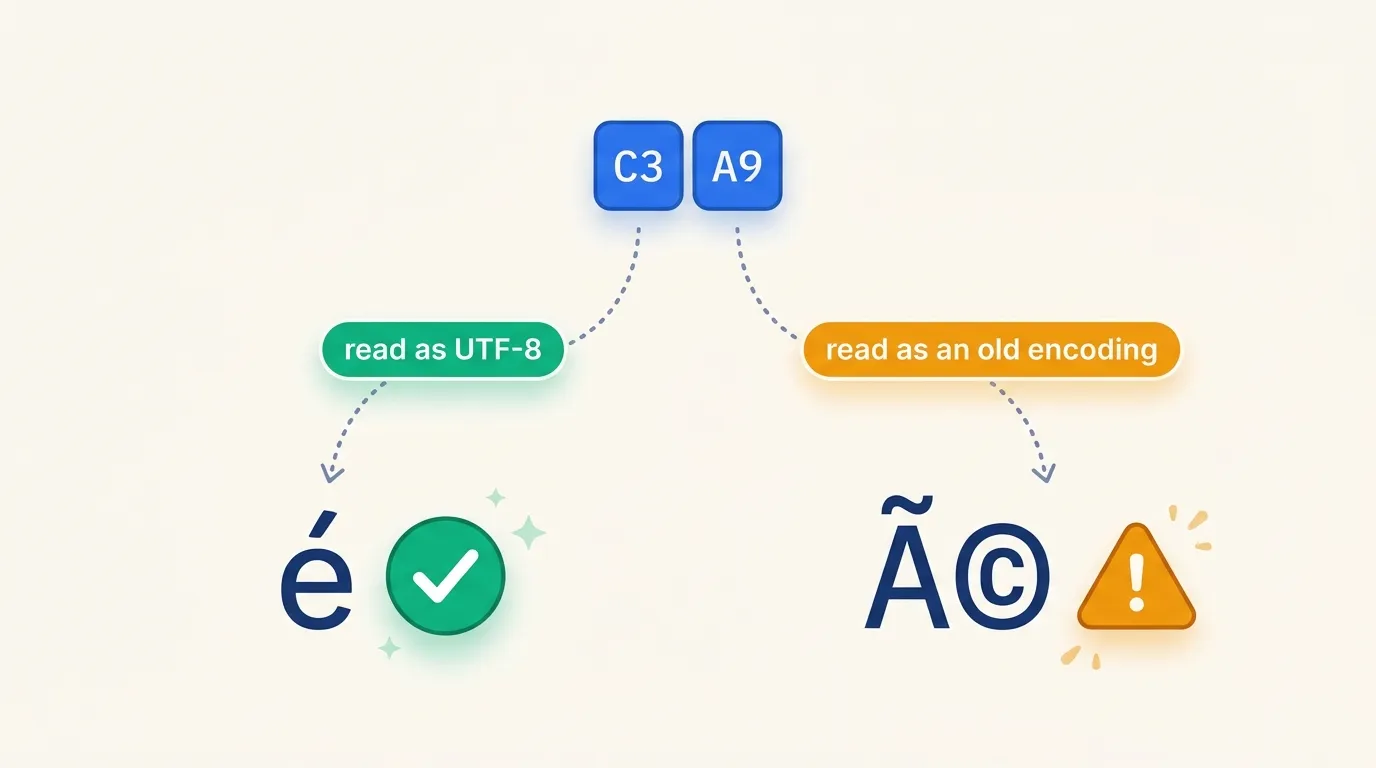
For NLP, bytes are a handy unit. A model whose units are characters needs room for 150,000 of them, and it still meets characters it has never seen. A model whose units are bytes needs only 256, and every possible text is made of them. That's why many tokenizers start from UTF-8 bytes, as the next post shows.
The math
Code points
Definition 1 (Code point). Unicode assigns each character a unique
integer, its code point , with (0x
marks a hexadecimal number). A code point is written U+ followed by at least four hex digits. A text is
then a sequence of code points , where is its
length in characters.
There are possible code points. Since is too few and is enough, a code point needs 21 bits.
Encodings
Definition 2 (Encoding). An encoding turns a sequence of code points into a sequence of bytes (integers from 0 to 255), in a way that can be reversed. Turning the bytes back into code points is decoding. A fixed-length encoding uses the same number of bytes for every code point. A variable-length encoding doesn't.
ASCII is the old one-byte code for the first 128 code points. UTF-32 is a fixed-length encoding: 4 bytes per code point, so a text of characters takes bytes. UTF-8 is variable-length.
Key equation (UTF-8 length). UTF-8 stores code point in
bytes, so a text takes bytes. Take the text
Great café, only ₪5 😀. It has 18 ASCII characters, plus é (2 bytes), ₪ (3) and 😀 (4):
bytes, against in UTF-32.
How UTF-8 packs the bits
Key equation (UTF-8 bit layout). The code point's bits are cut into chunks. Each byte starts with a few marker bits that say what it is, followed by one chunk:
| Bytes | Free slots (x) | Byte 1 | Bytes 2–4 |
|---|---|---|---|
| 1 | 7 | 0xxxxxxx | none |
| 2 | 5 + 6 = 11 | 110xxxxx | 10xxxxxx |
| 3 | 4 + 6 + 6 = 16 | 1110xxxx | 10xxxxxx ×2 |
| 4 | 3 + 6 + 6 + 6 = 21 | 11110xxx | 10xxxxxx ×3 |
Each x is an empty slot. You fill the slots with the bits of the code point,
left to right. The 0s and 1s written in the table are the marker bits. They
never change. In a character of 2 or more bytes, the number of 1s at the start
of the first byte equals the number of bytes. Every byte after the first, called
a continuation byte, starts with 10.
The slots also explain the limits in the length equation. With 7 slots, the largest number is , so 1 byte stops at 0x80 = 128. With 11 slots, 2 bytes stop at = 0x800. With 16 slots, 3 bytes stop at = 0x10000.
The simplest case is a, code point 97, which is 1100001 in binary. Those 7
bits fill the 7 slots of 0xxxxxxx, giving 01100001 = 0x61. That's one byte,
the same as in ASCII.
Now take é, code point U+00E9 = 233. It's between 0x80 and 0x7FF, so it takes
2 bytes with 11 slots. In binary, 233 is 11101001, which is only 8 bits, so we
add zeros on the left to fill the 11 slots: 00011 101001, with a space only to
show the two groups. The first 5 bits go
after 110, the last 6 after 10:
So é is stored as C3 A9. Click é in the widget above to see the same
packing, and then try ₪ (3 bytes) and 😀 (4 bytes).
Reading a file back
A file holds only bytes, with no separators or lengths. Here is our whole review as saved on disk, all 27 bytes in hexadecimal:
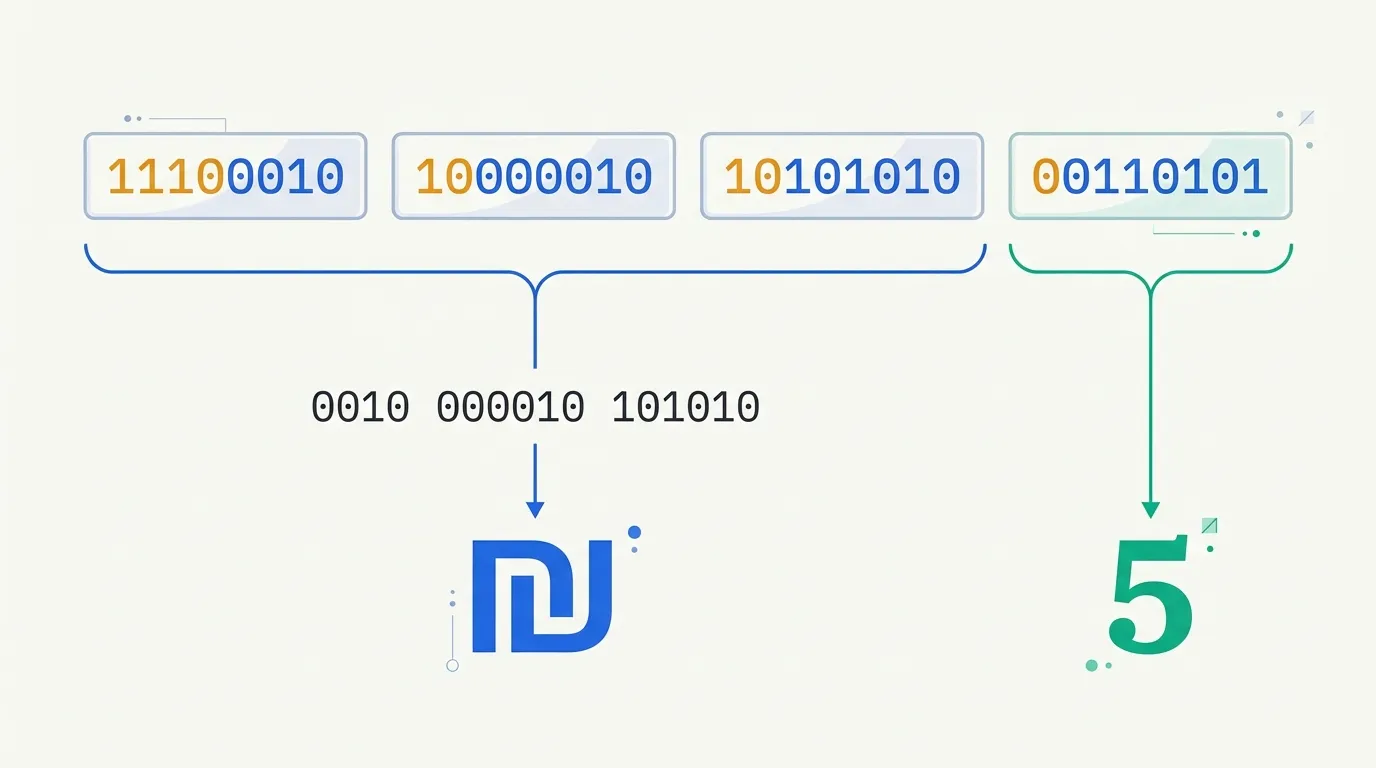
47 72 65 61 74 20 63 61 66 C3 A9 2C 20 6F 6E 6C 79 20 E2 82 AA 35 20 F0 9F 98 80A decoder reads the marker bits of a first byte, takes that many bytes, then
repeats. Here is the ₪5 part, E2 82 AA 35, written in bits:
11100010 10000010 10101010 00110101- The first byte starts with
1110, so this character takes 3 bytes. The next two start with10, as they should. - Remove the marker bits and join the rest:
0010 000010 101010. That's 0x20AA, the code point of₪. - The next byte starts with
0, so it's a character by itself: 0x35, the digit5.
Useful properties
The layout has useful properties:
- ASCII-compatible: a byte below 128 is always a whole ASCII character.
- No zero bytes, except for the code point U+0000 itself.
- Self-synchronizing: a byte starting with
10is never the start of a character. Jump into the middle of a file, skip at most 3 such bytes, and you're at the start of the next character.
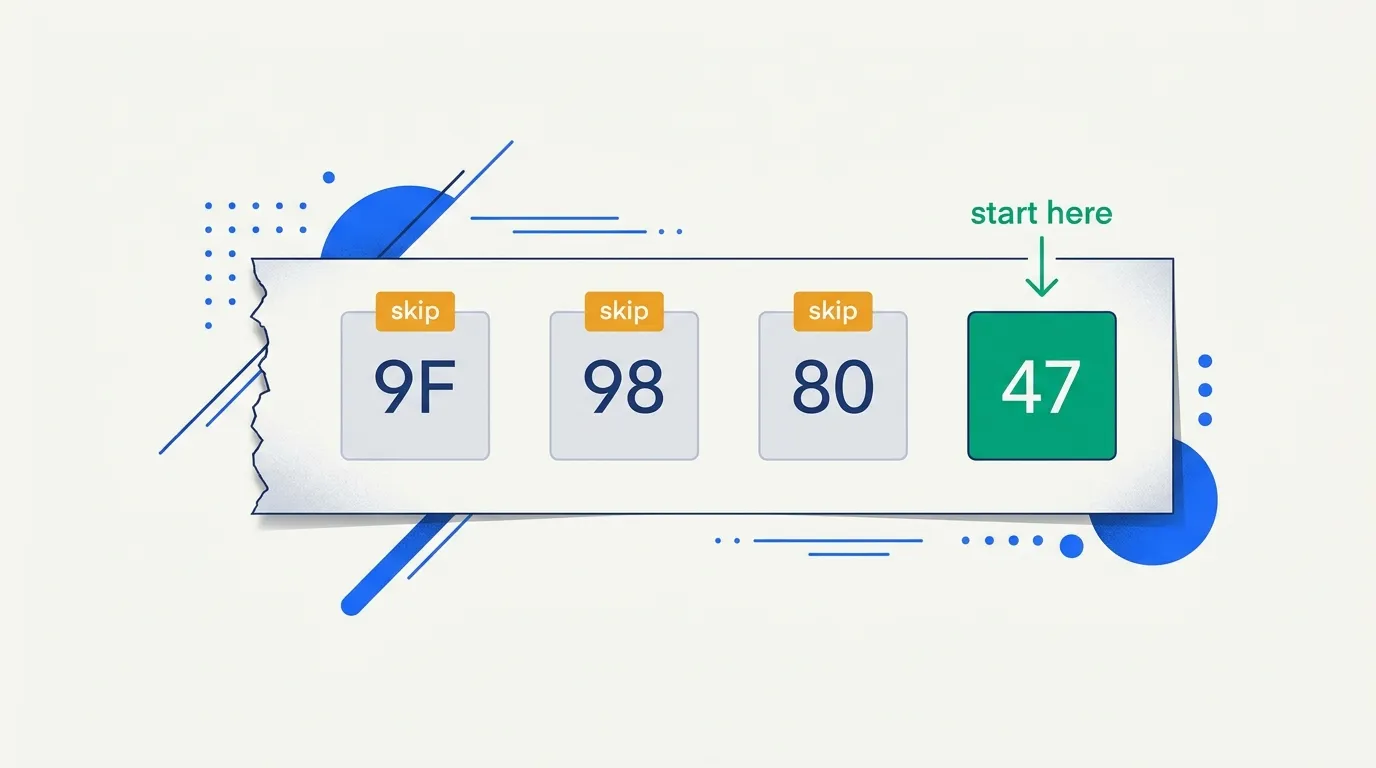
In Python, a string is a sequence of code points, and encode gives the
bytes:
text = "Great café, only ₪5 😀"
print(len(text))                           # 21 characters (code points)
data = text.encode("utf-8")
print(len(data))                           # 27 bytes
print(hex(ord("é")), data[9:11].hex(" "))  # 0xe9 c3 a9
print(len(text.encode("utf-32-be")))       # 84 bytes
Exercises
Each question has one correct answer. Pick your answer, then read the explanation. Questions 6–10 use the definitions and equations above.
You can change your answer at any time. The answers come in a new order each time.
1. (Intuition) ASCII used one byte per character and only numbers below 128. Why was that enough for English, but not for Hebrew?
2. (Intuition) Are a, a (bold) and a (italic) the same code point?
3. (Intuition) A friend's name, Zoë, shows up in a spreadsheet as "Zoë". What went wrong?
4. (Intuition) Compare "hello" and "שלום" in UTF-8. Which statement is true?
5. (Intuition, widget) In the widget, replace the text with a thumbs-up with a skin tone: 👍🏽. How many characters does it show?
6. (Math · Definition 1) Why does a code point need 21 bits, and not 20?
7. (Math · UTF-8 length) How many bytes does "naïve ₪100 🎉" take in UTF-8, and in UTF-32?
8. (Math · UTF-8 bit layout) How is the Hebrew letter ש (U+05E9) encoded in UTF-8?
9. (Math · UTF-8 bit layout) Which character do the bytes E2 82 AC encode?
10. (Math · self-synchronizing) A download breaks in the middle of our review, and the part you got starts with the bytes 82 AA 35 20 .... Where is the first whole character?
Score: 0 of 10 (0 answered)
Next: byte-pair encoding (BPE), the algorithm that builds a tokenizer's vocabulary from these bytes (section 2.4).